Most incidents at a small business never get a full disk image. There is one responder, no spare disks and a user who needs the laptop back. Triage collection fits that reality. This is the workflow I use, built and practised on a lab machine with planted artifacts. No client data is involved.
Why these two tools
They answer different questions. KAPE collects the artifacts that matter in minutes and parses them with Eric Zimmerman’s tools, which tells you what happened and when. THOR Lite scans files and autoruns against Nextron’s open-source YARA set of about 4,000 rules plus any IOCs you add, which tells you whether anything on the disk is known-bad. Used together, THOR Lite points at a file and the parsed timeline shows whether that file ran, persisted or arrived when the story says it did.
Licences first
Check the licence before the tool, especially if you do paid work.
- KAPE is free for internal company use, government and education, according to Kroll. Kroll states it is not available for use on a third-party network or as part of a paid engagement.
- THOR Lite may be used internally, by government and for education and research, according to Nextron. Use on third-party networks or as part of a paid engagement needs THOR Enterprise.
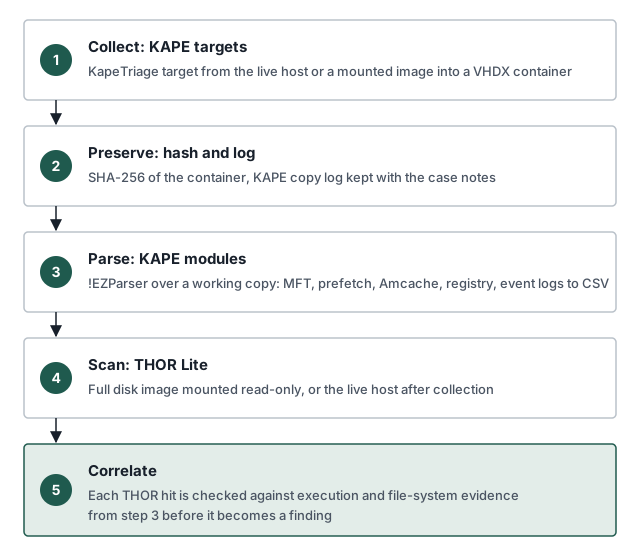
1. Collect
Run KAPE from external media or a network share, never from the suspect disk, and write output to the same external location.
kape.exe --tsource C: --target KapeTriage --tdest E:\cases\LAB-WS01\tdest --vhdx LAB-WS01 --zv falseThe KapeTriage compound target collects the usual triage set: registry hives, event logs, file system metadata, prefetch, Amcache and similar. --vhdx packages the collection into a container named after the host. --zv false keeps the loose copy as well, which is convenient for parsing. Record the start time, the host and who ran the collection in the case notes.
2. Preserve
Hash the container before anything else touches it, and keep KAPE’s copy log with the case notes.
Get-FileHash -Algorithm SHA256 -Path E:\cases\LAB-WS01\tdest\*.vhdxFrom here on, work only on copies. The hashed container is the evidence. Everything else is a working set.
3. Parse
Run the parsing modules over the working copy.
kape.exe --msource E:\cases\LAB-WS01\tdest\C --mdest E:\cases\LAB-WS01\mdest --module !EZParser --mflush!EZParser runs Eric Zimmerman’s parsers across the collection and writes CSV. Timeline Explorer is the fastest way to read the output.
4. Scan
This is the step people get wrong. A KAPE triage collection holds artifacts, not every binary on the disk. THOR Lite scanning a triage container will miss a payload sitting in a user’s AppData folder, because KapeTriage never collected it.
So THOR Lite runs against something that holds the files:
- In the lab, a full disk image of the test machine, mounted read-only.
- On a live host, THOR Lite on the host itself, after KAPE collection is complete, so the scan cannot disturb anything collection needed.
Mount-DiskImage -ImagePath E:\cases\LAB-WS01\work\LAB-WS01-full.vhdx -Access ReadOnlythor64-lite.exe -a Filescan -p F:\ -e E:\cases\LAB-WS01\thorTHOR Lite has a smaller flag set than full THOR. Lab mode (--lab) needs a forensic lab licence and is not part of Lite, so check --help on your build before scripting it.
5. Correlate
A THOR hit is a lead. It becomes a finding when the parsed artifacts say the file ran, persisted or arrived at a time that fits the story.
| Question: | Artifact: | Parser: |
|---|---|---|
| Did it run? | Prefetch, Amcache | PECmd, AmcacheParser |
| When did it arrive? | $MFT standard information and file name timestamps |
MFTECmd |
| Does it persist? | Run keys, services, scheduled tasks | RECmd, EvtxECmd |
| Who ran it? | Security 4688, Sysmon 1, UserAssist | EvtxECmd, RECmd |
Each question maps to an artifact and a parser, so a THOR hit can be checked in minutes instead of argued about.
Two cautions. Prefetch is off by default on Windows Server, so its absence there proves nothing. Shimcache presence on Windows 10 and later does not prove execution on its own. A mismatch between the standard information and file name timestamps in $MFT is worth a second look for timestomping.
Practise against known plants
Build a lab machine, plant artifacts you know about, then run the workflow and check that every plant is found. Useful plants are a Run key, a scheduled task, a new service, an EICAR test file in a user’s Downloads folder and an encoded PowerShell command. A workflow that has not been tested against known plants has gaps you have not found yet.
Sources
- Kroll: KAPE
- Eric Zimmerman: tools and documentation
- Nextron Systems: THOR Lite
- Nextron Systems: THOR manual, scanning