During a Google Workspace to MS 365 migration, MigrationWiz showed two shared mailboxes at 1.67 and 1.82 times the size Google reported for them. The numbers were not wrong. They answered a different question from the one I was asking.
What the field measures
In my runs, the Mailbox Size figure in MigrationWiz tracked what the tool expected to write to the destination, not what sat in the source. For a personal mailbox the two numbers were close. For a shared team mailbox they were not.
Where the extra comes from
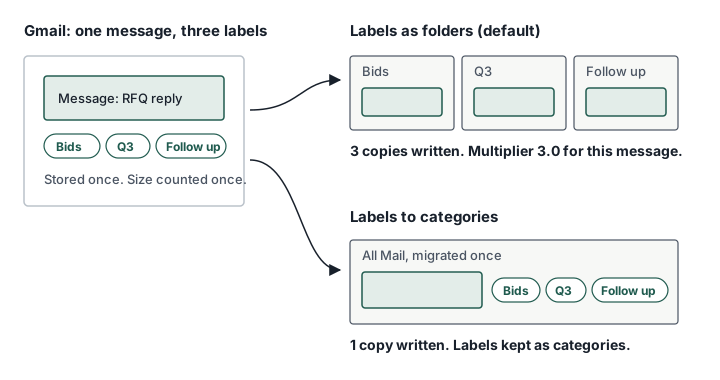
Gmail has labels. Exchange has folders. A Gmail message can carry several labels and still be stored once. BitTitan’s documentation states that by default labels are converted to folders, and a message with several labels is copied into each one, which inflates mailbox size on the destination.
Measuring it
The multiplier is the MigrationWiz forecast divided by the size Google reports for the same mailbox. I measured it on a sample before committing to a cutover plan.
| Mailbox: | Type: | Multiplier: |
|---|---|---|
| Procurement team inbox | Shared | 1.03 |
| User A | User | 1.00 |
| User B | User | 1.01 |
| Bids team inbox 1 | Shared | 1.67 |
| Bids team inbox 2 | Shared | 1.82 |
Personal mailboxes sit near 1.0. Shared mailboxes where several people apply their own labels to the same messages carry the multiplier.
The pattern makes sense once you look at how a team uses a shared inbox. Several people can label the same message for their own workflow, and every label is another copy once it becomes a folder.
Why it matters
Mailbox limits. MS 365 Business Premium gives a 100 GB primary mailbox and an archive that starts at 100 GB and can auto-expand to 1.5 TB. MS documents two catches: auto-expanding archiving supports growth of no more than 1 GB a day, and extra storage can take up to 30 days to provision. Inside a migration window I treat the archive as roughly fixed at 100 to 110 GB. A source mailbox that fits comfortably can stop fitting once the multiplier is applied.
Pass time. The destination write volume is the forecast, not the source. EWS throttling relief stopped passes aborting in my runs, but the per-mailbox write rate still sat near 150 MB every five minutes, about 1.8 GB an hour. At that rate a mailbox forecast at 90 GB needs about 50 hours of writing on its own, before retries.
Licensing. If the forecast pushes a service mailbox past what a shared mailbox can hold, the answer may be a licensed mailbox with an archive. That is a cost decision better made before cutover week.
Options
| Option: | What happens: | Trade-off: |
|---|---|---|
| Labels as folders (default) | Each label becomes a folder holding its own copy | Familiar view for users; size inflates by the multiplier |
| Labels to categories | MigrationWiz migrates All Mail once and applies labels as Exchange categories | One copy per message; a flatter mailbox; BitTitan notes Trash and deleted items need a separate pass |
| Split oversized mailboxes | Primary and archive migrated as separate projects | Keeps large mailboxes from blocking the rest; more project admin |
| Leave the overflow in Google | Older mail stays behind | Cheapest now; fails if the goal is a full exit from Google |
The choice depends on how the mailbox is used. For personal mailboxes with a multiplier near 1.0, the default is fine. For shared team inboxes where labels are personal workflow markers, categories preserve the information without the copies. I would ask the mailbox users how they work before choosing, because a flat mailbox is a visible change for them.
Checklist
- Pull per-mailbox sizes from the Google Admin console before the first pass.
- Run a pre-stage pass on the largest mailboxes and compare the forecast with the Google figure.
- Treat any multiplier above about 1.2 as a decision, not a number.
- Size primary and archive against the forecast, not the source.
- Plan large mailboxes around the per-mailbox write rate, not around the throttling relief.
Sources
- BitTitan: labels, folders and categories in Google to MS 365 migrations
- BitTitan: disabling EWS throttling in Exchange Online
- MS Learn: auto-expanding archiving
- MS Learn: Exchange Online limits