This is the short version of a 19-section build manual and an OS companion I wrote for a single-node Wazuh deployment covering about 80 Windows endpoints. It keeps the decisions and drops the screenshots. Addresses and names are examples.
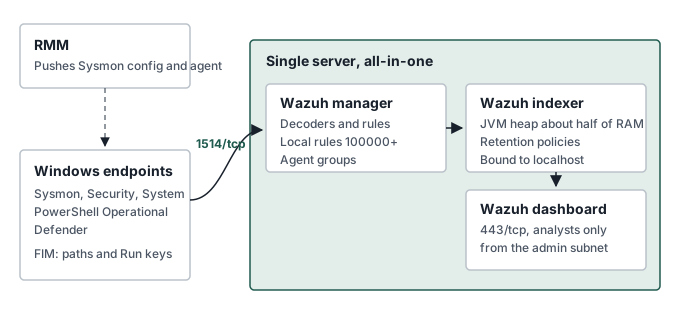
Single node or distributed
Wazuh’s quickstart sizes an all-in-one host for 51 to 100 agents at 8 vCPU, 8 GiB of RAM and 200 GB of storage for 90 days of alerts. At this size a single node is the right call. A distributed cluster doubles the maintenance for a team of one, and the failure it protects against is better handled with backups and a tested rebuild.
Ubuntu 22.04 or 24.04
The first version of the manual targeted 22.04, which was the most tested platform at the time. The companion moved to 24.04: standard support runs to 2029, the Wazuh package path is the same, and Wazuh’s quickstart lists 24.04 as a recommended OS. Check the supported list for the Wazuh release you install rather than relying on this note.
Size for memory, not CPU
The indexer is a JVM process. It wants a large heap and a large page cache, and it wants them all the time. The usual guidance for OpenSearch-based indexers is a heap of about half the RAM, staying under 32 GB so compressed object pointers stay on. The other half goes to the file system cache.
That shaped which server got which job. On paper the SIEM went on the smaller server and the DFIR stack on the larger one. That was the wrong way round. The DFIR stack is bursty: heavy during an investigation, close to idle otherwise. The SIEM is a constant load. The SIEM moved to the server with more memory.
Disk layout
I use LVM on a mirrored pair, with separate logical volumes so one runaway writer cannot fill the whole disk.
| Mount: | Why it is separate: |
|---|---|
/ |
Stays small; the OS should never fill |
/var/log |
OS and audit logs keep writing when an application volume fills |
/tmp |
Can be mounted noexec |
/var/ossec |
Manager state, queues and archives |
/var/lib/wazuh-indexer |
Index data; grows with retention |
Leave free space in the volume group. Growing a logical volume online is quick. Shrinking one is not.
Full-disk encryption is a trade-off on a server. LUKS2 protects data if a disk leaves the building. It also means an unattended reboot stops at a passphrase prompt until someone opens the remote console, unless the key is bound to the TPM or a network unlock. For a server in a locked rack I document the choice and the recovery path either way, so the decision is visible to an assessor.
Before Wazuh goes on
Set the static address before installing anything. Agents enroll against it, and moving the manager later means re-pointing every agent.
# /etc/netplan/50-static.yaml  (example addresses)
network:
  version: 2
  ethernets:
    eno1:
      addresses: [10.0.10.20/24]
      routes:
        - to: default
          via: 10.0.10.1
      nameservers:
        addresses: [10.0.10.1]
Then the usual baseline: time sync with chrony, since every correlation depends on clocks agreeing; SSH with keys only and no root login; auditd; Secure Boot on. FIPS-validated cryptography on Ubuntu comes through Ubuntu Pro, which is worth pricing if the server sits inside an assessed boundary.
Firewall rules follow the diagram. Endpoints reach the agent ports. The admin subnet reaches SSH, the dashboard and the API. Nothing reaches the indexer.
sudo ufw default deny incoming
sudo ufw default allow outgoing
sudo ufw allow from 10.0.20.0/22 to any port 1514 proto tcp   # agent events
sudo ufw allow from 10.0.20.0/22 to any port 1515 proto tcp   # agent enrollment
sudo ufw allow from 10.0.99.0/24 to any port 22 proto tcp     # SSH, admin subnet
sudo ufw allow from 10.0.99.0/24 to any port 443 proto tcp    # dashboard
sudo ufw allow from 10.0.99.0/24 to any port 55000 proto tcp  # Wazuh API
sudo ufw enable
Install
The assisted installer handles the all-in-one case. The version in the path was 4.14 at the time of writing.
curl -sO https://packages.wazuh.com/4.14/wazuh-install.sh
sudo bash ./wazuh-install.sh -a
The installer writes wazuh-install-files.tar into the working directory. It holds the certificates and wazuh-passwords.txt. Move the passwords into the vault, then move the archive somewhere only root can read. Leaving it in a home directory is a common way to hand over the whole SIEM.
Agents through RMM
Create the agent group on the manager before rollout, so agents land in it on enrollment.
sudo /var/ossec/bin/agent_groups -a -g windows-workstationsDeploy in order: Sysmon first with the SwiftOnSecurity configuration, then the agent. Through an RMM the agent install is two lines.
msiexec.exe /i wazuh-agent-4.14.8-1.msi /q WAZUH_MANAGER="10.0.10.20" WAZUH_AGENT_GROUP="windows-workstations"
NET START WazuhSvc
The group’s shared configuration adds the channels that are not collected by default and the integrity monitoring paths.
<!-- /var/ossec/etc/shared/windows-workstations/agent.conf -->
<agent_config os="Windows">
  <localfile>
    <location>Microsoft-Windows-Sysmon/Operational</location>
    <log_format>eventchannel</log_format>
  </localfile>
  <localfile>
    <location>Microsoft-Windows-PowerShell/Operational</location>
    <log_format>eventchannel</log_format>
  </localfile>
  <localfile>
    <location>Microsoft-Windows-Windows Defender/Operational</location>
    <log_format>eventchannel</log_format>
  </localfile>
  <syscheck>
    <windows_registry arch="both">HKEY_LOCAL_MACHINE\Software\Microsoft\Windows\CurrentVersion\Run</windows_registry>
    <directories check_all="yes" realtime="yes">C:\Windows\System32\drivers\etc</directories>
  </syscheck>
</agent_config>
PowerShell script block logging is off by default on Windows. Turn it on through policy or the RMM, or the PowerShell channel carries far less than it could.
First custom rules
Custom rules go in /var/ossec/etc/rules/local_rules.xml with IDs from 100000 upward. Two examples follow. They build on the stock Sysmon process-creation rule, which was 61603 in the ruleset I used; confirm the ID in your version before relying on it.
<group name="local,sysmon,">
  <rule id="100001" level="10">
    <if_sid>61603</if_sid>
    <field name="win.eventdata.image" type="pcre2">(?i)\\(anydesk|teamviewer)\.exe$</field>
    <description>Unapproved remote access tool started: $(win.eventdata.image)</description>
    <mitre>
      <id>T1219</id>
    </mitre>
  </rule>

  <rule id="100005" level="12">
    <if_sid>61603</if_sid>
    <field name="win.eventdata.image" type="pcre2">(?i)\\(powershell|pwsh)\.exe$</field>
    <field name="win.eventdata.commandLine" type="pcre2">(?i)\s[-/]e[a-z]*\s+[A-Za-z0-9+/=]{40,}</field>
    <description>PowerShell started with an encoded command</description>
    <mitre>
      <id>T1059.001</id>
      <id>T1027</id>
    </mitre>
  </rule>
</group>
The encoded-command pattern requires a long base64 argument after any abbreviation of -EncodedCommand. That avoids firing on -ExecutionPolicy Bypass, which also starts with -e. Test every rule with /var/ossec/bin/wazuh-logtest and a real event before restarting the manager.
Retention and backups
Set an index lifecycle policy for the alert indices in the dashboard. The retention period is an organizational decision under NIST SP 800-171 3.3.1, so write the number into the SSP and size the disk for it.
Back up /var/ossec/etc on a schedule. It holds the configuration, custom rules and decoders, the shared group configuration and client.keys. Losing client.keys means every agent has to enroll again.
Sources
- Wazuh: quickstart and sizing
- Wazuh: deploying the Windows agent
- Wazuh: rules syntax
- SwiftOnSecurity: sysmon-config